How to make Vendor Payments via Zinifly
FOR CURRENT VENDORS ONLY

FOR CURRENT VENDORS ONLY

1. Scan QR code to Login to Zinifly, or Visit Website: https://lafayettefarmersmarketatmoncus.zinifly.com/login
2. Click on Forgot Your Password. Use your current market email. Current Market email refers to the address you receive emails from Derrion & Sheila.
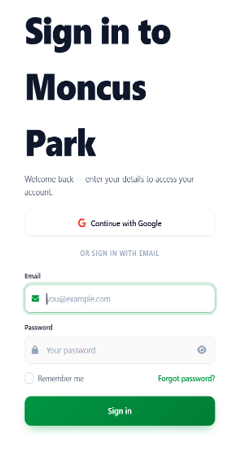
3. You will receive an e-mail from Moncus Park called “Reset Your Password – Moncus Park.” Click on the blue button that says Reset Password.
4. Enter a difficult to guess password. Save this password on your device and write it down somewhere secure. You will be taken back to the login.
5. Login with your new password and Finish account Setup. Add payment method (Credit Card).
1. Scan QR code to Login to Zinitly, or Visit Website: https://lafayettefarmersmarketatmoncus.zinifly.com/login
2. Sign-in with your market e-mail and password. If you have not set-up your account yet, follow the instructions above.
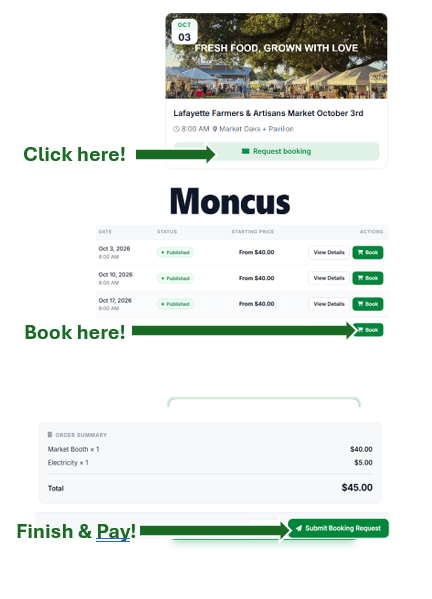
3. Click Request Booking for the Market date you’d like to attend. This will take you to the Events page. Click the Book button to book your market.
4. Select Tent & Electricity needs then click submit booking request to pay for Market! Finish & Pay.